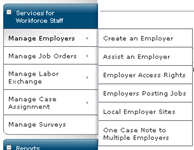
From the left panel select Manage Employers → Assist an Employer
This may seem counterintuitive to assist an employer before creating one, but you have to search Career Connect to see if that employer already exists.
This is the same process when searching for an employer to assist.
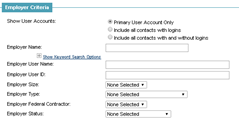
Search for employer by User Name, FEIN or other
Since users could have used different spellings of an employer name, it’s best to use part of the employer name (e.g., “Chase” vs. “Chase Bank”.
The more filter selections used, the fewer the results. All conditions in the filters must be true for an employer to be returned.
If no employer is found, proceed to creating an employer.
If an employer is found you might create a location or be case assigned.

Comments
0 comments
Please sign in to leave a comment.