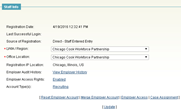
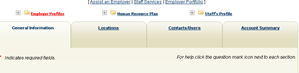
Editing an Employer Kurt Vannucci April 20, 2017 21:20 Updated Editing an Employer Screenshots Notes Click <<Edit>> or <<Update>> on the bottom of any Employer Section Whether it’s <<Edit>> or <<Update>> depends on the configuration of the system for that section. You can also see the General Information on the tabs You can see more options by clicking on the “+” above the tabs. Related articles On-The-Job Training Materials 2023 Quarterly Follow Up Procedure Adding Locations Search for Existing Employers Comments 0 comments Please sign in to leave a comment.

Comments
0 comments
Please sign in to leave a comment.