You will need to find jobs for your clients, and in Career Connect it’s a pretty easy process.
Searching for Jobs
|
Screenshots
|
Notes
|
|
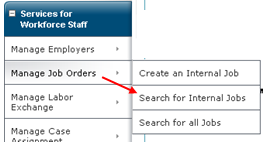
Choose <<Search for Internal Jobs>> on the left panel.
|
|
|
|
Set Search Criteria
|
|
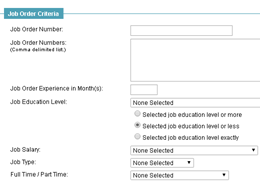
There are A LOT of criteria you can filter your job with. Just keep in mind that every criterion must match for the jobs you’re searching for.
Here you see why making the job post as complete as possible will be useful for others.
|
|
Search for recent jobs
|
|
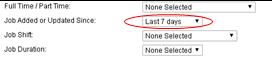
Look for the “Job Added or Updated Since” filter and set to your desired range.
|
|
Click the <<Search>> button
|
|
|

Comments
0 comments
Please sign in to leave a comment.